Case Study: 3D Interfaces
Bringing UI/UX into the Third Dimension
For 95% of mobile user interfaces, the best choices are tried and true 2D (or 2.5) designs which draw upon familiar, popular, and attractive aesthetics without challenging the user’s ability to absorb new interaction methodologies.
Skeuomorphic interfaces (as championed by Steve Jobs) were popular in the early days of the iPhone. These attempted to mimic the exact nature of physical objects such as stitched leather and metal.
Skeuomorphism’s emphasis on physical objects eventually was replaced by flat design after Jobs’ passing, but Apple is slowly moving back to physical visual elements with their Liquid Glass interfaces.
When StreamSide designed their first app (Spirit Story Box), co-founder Jill Beitz was drawn to the idea that the interface should resemble a physical piece of equipment.
As a paranormal investigator, she was sadly aware that other investigators generally distrust apps, while at the same time trusting physical devices (in spite of the fact that such physical devices often contain computer circuitry and algorithms).
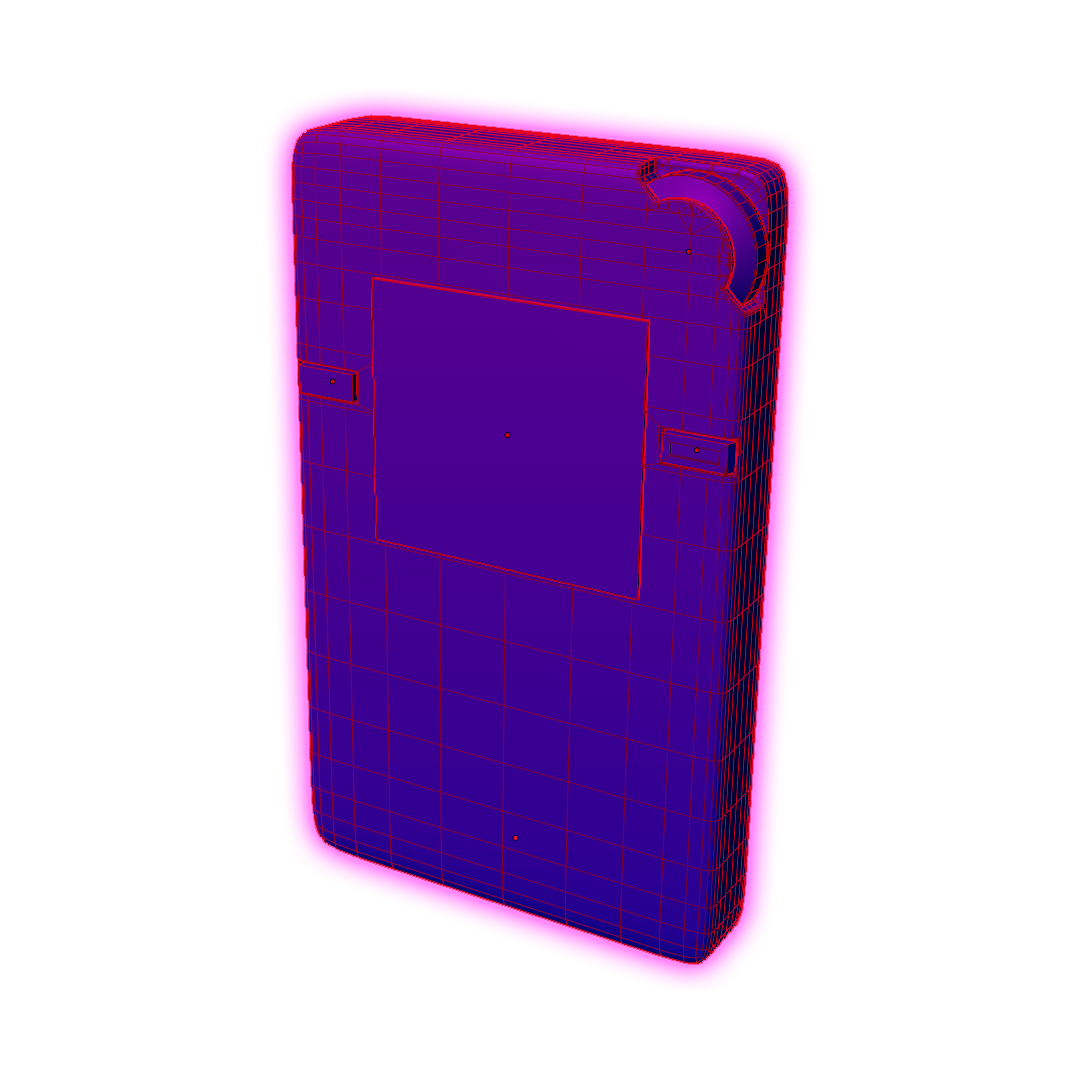
When it came time to create a replica of a digital audio recorder, I decided to replicate an actual 3D device by combining a custom-made Blender model, composite textures, dynamic lighting, physical based rendering (PBR) materials, and equirectangular 360º photographic environments, all of which combine to form an immersive visual experience.
ER 70 EVP Recorder App
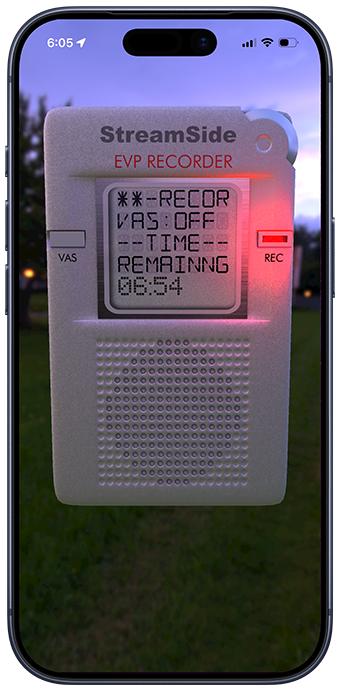
We knew we had to nail every part of the UI, and perhaps the trickiest part of the execution came down to the screen of the LCD display.
The display had to both reflect the opposite view of the physical environment (behind the user), and display a realtime readout of the recording status as the app captured audio.
The 3D model was loosely based off of the Panasonic RR-DR60, but we did not want to mimic the exact look and operation of that device’s buttons and screens, since these interface elements didn’t weren’t inherently intuitive in an app.
Still, I wanted the user to be able to tap the “REC” recording button, tap the “VAS” voice activated system button, and tap the scroll wheel in order to playback the last-recorded audio file. Haptic feedback mimics the feel of these buttons as they are “clicked.”
While the app is recording, I also wanted a red visual indicator light to appear which lights the device dynamically so as to appear to be a part of the environment.
Moreover, all of these interface elements needed to be VoiceOver compatible for persons with disabilities.
All of these goals were achieved but were not as easy as using off-the-shelf visual components.
ER70 LCD Screen
For the display screen on the device which replicates a Liquid Crystalline Display (LCD), multiple image layers and custom fonts were stacked to mimic “lit” and “unlit” LCD segments as commonly seen on real devices.
The 3D scene is implemented using Apple’s SceneKit framework. The LCD screen is composited using Apple’s SpriteKit framework and then mapped onto one of the SceneKit surface materials.
As the user rotates their iPhone, the background rotates with it, and the lighting on the device and reflection on the simulated glass surface changes as well. This type of hyperrealism cannot be achieved without PBR and 3D modeled scenes.
RP Rabbit Holes
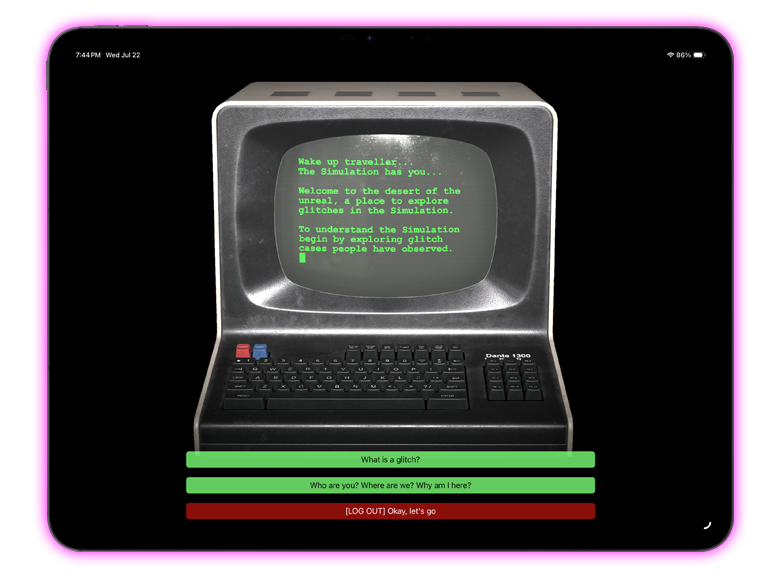
A similar combination effect (SpriteKit + SceneKit) was added to StreamSide’s “RP Rabbit Hole” app, in order to simulate a person typing at an old CRT computer terminal.
RP Rabbit Holes explores the idea of living in a simulation.
The idea behind the computer terminal was to allow the user to converse with a mysterious figure named “Virgil” who communicates from the netherworld, somewhere outside of the Matrix.
This is a rare complex interface which combines a “kitchen sink” of methodologies:
- UIKit and Storyboards (chosen to simplify button overlays on top of the 3D display)
- SwiftUI (in order to connect seamlessly with the rest of the app)
- SceneKit (for the 3D computer terminal)
- SpriteKit (for the screen display)
Lessons/Take Aways
Creating custom 3D UI/UX experiences is time consuming and should be carefully considered before undertaking such a daunting task.
The upsides/deciding factors are as follows:
- The immersive nature of such interfaces are unmatched
- In cases where you want to visually communicate that a user is operating a real device (such as piece of electronic or musical equipment), it is hard to deny the authenticity this aesthetic brings to the table.
Downsides:
- Designing and working with 3D interfaces is an involved process that requires a lot of planning and potential work-arounds.
- Accessibility for 3D buttons and elements can be challenging, although Apple’s frameworks support accessibility in their 3D frameworks.
- If game engines (such as Unity 3D or Unreal) are employed for cross-platform compatibility, this usually bloats the size of the distributed binary.